By the Numbers
- STATAccording to the Australian Communications and Media Authority (ACMA), over 14 million Australians still rely on free-to-air digital TV, with Sydney’s metropolitan transmitters delivering UHF signals in the 520-820 MHz range
- STATThe Australian Bureau of Statistics (ABS) reports that 67% of Australian households use free-to-air TV as their primary or secondary viewing source as of 2023
- STATCommunications Alliance data shows that faulty or corroded coaxial cable connections account for approximately 40% of residential TV signal complaints in metropolitan areas
When your TV signal starts pixelating, dropping out, or displaying a “no signal” message, the frustration is immediate. Before searching for an antenna fix specialist, there are several safe diagnostic checks you can perform indoors that often resolve common signal issues without requiring a technician visit. Understanding what you can legally and safely troubleshoot yourself versus what requires an ACMA-registered cabler under the Telecommunications Act 1997 (Cth) helps you make informed decisions about your antenna repair needs.
As an ACMA-licensed cabling technician with over 40,000 completed jobs across Greater Sydney, I’ve seen countless cases where homeowners can restore their TV reception through simple indoor checks. However, I’ve also witnessed dangerous situations where well-meaning property owners attempted roof work or antenna repositioning without proper licensing or safety equipment, violating both the Australian Communications and Media Authority (ACMA) Cabling Provider Rules 2014 and the Work Health and Safety Act 2011 (NSW).
This guide walks you through the safe troubleshooting steps you can perform before calling Sydney Cabling, clearly identifying the boundary between homeowner diagnostics and licensed cabler work.
What Homeowners Can Legally Do vs Licensed Cabler Work Under ACMA Cabling Provider Rules 2014
The Australian Communications and Media Authority (ACMA) Cabling Provider Rules 2014 establish clear boundaries for telecommunications cabling work. Homeowners can legally perform basic indoor diagnostics including retuning digital TV channels, inspecting accessible F-type connectors on coaxial cables, testing multiple TV sets to isolate problems, and checking wall plates for visible damage.
However, any work involving roof access, antenna repositioning, masthead amplifier replacement, coaxial cable installation or modification, splitter replacement in roof cavities, or connection of new distribution amplifiers must be performed by an ACMA-registered cabler holding Open Cabler Registration. This requirement exists under the Telecommunications Act 1997 (Cth) to ensure signal quality, prevent interference with telecommunications networks, and protect public safety.
The Work Health and Safety Act 2011 (NSW) and Work Health and Safety Regulation 2017 (NSW) further prohibit untrained persons from working at heights above two metres without proper fall protection equipment, risk assessments, and safety procedures. Antenna work typically occurs at roof height, making it inherently high-risk work requiring professional training and equipment.
For a detailed comparison of what constitutes safe homeowner checks versus licensed work, refer to our guide on DIY antenna repairs vs professional service, which outlines specific ACMA compliance requirements.
Check Your TV’s Digital Tuning Settings (Safe Indoor Fix)
The most common cause of sudden signal loss is outdated channel tuning. Sydney’s digital TV transmitters at Artarmon, Balgowlah Heights, and Willoughby occasionally undergo frequency changes or power adjustments that require your TV’s digital tuner to rescan for channels.
Access your TV’s menu system and locate the tuning or channel setup section. Different manufacturers label this function as “Auto Tune,” “Channel Search,” “Digital Scan,” or “Retune Channels.” Select the option to perform a full scan rather than an update scan, as this forces your TV to search the entire UHF frequency range from 520-820 MHz rather than just checking existing channel allocations.
Before starting the scan, ensure your TV input is set to “Antenna” or “TV” rather than HDMI or other external inputs. Some modern TVs include an “Antenna Power” setting in the menu that supplies 5V DC power to masthead amplifiers through the coaxial cable. If your antenna system includes a masthead amplifier and this setting is disabled, you’ll receive no signal despite having a functioning antenna.
The retuning process typically takes three to five minutes. Once complete, check whether all expected channels appear with adequate signal strength. Most TVs display signal strength and quality meters during manual tuning, showing values in dBm (signal strength) or as percentage bars. Acceptable signal strength for digital TV reception ranges from -30 dBm (excellent) to -65 dBm (minimum threshold), with values below -65 dBm causing pixelation or dropouts.
If retuning restores some channels but not others, this indicates frequency-specific signal issues rather than total antenna failure. For comprehensive guidance on optimising reception after retuning, see our article on how to boost antenna signal in Sydney.
Inspect Coaxial Cable Connections for Corrosion or Damage
Communications Alliance data shows that faulty or corroded coaxial cable connections account for approximately 40% of residential TV signal complaints in metropolitan areas. F-type connectors, which screw onto the antenna input on your TV and wall plates, are particularly vulnerable to corrosion in Sydney’s coastal suburbs including Manly, Coogee, and Maroubra.
Examine the F-type connector where the coaxial cable attaches to your TV. The connector should be hand-tight with no visible gaps between the connector body and the TV’s antenna input. Loose connections create impedance mismatches that degrade signal quality even when signal strength appears adequate.
Inspect the connector for green or white corrosion on the brass centre pin or threaded collar. Corrosion increases resistance and creates signal reflections that reduce Modulation Error Ratio (MER), the key metric for digital TV signal quality. Even minor corrosion can drop MER below the 23 dB threshold required for reliable reception.
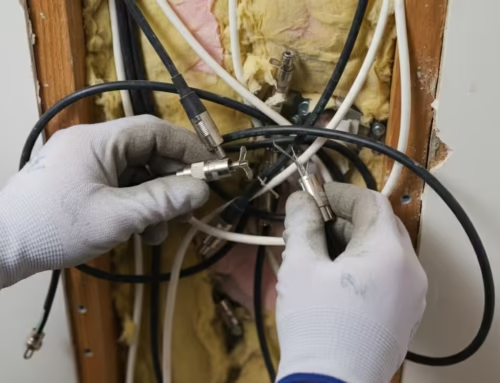
Check the coaxial cable itself for visible damage including kinks, compression damage from furniture or doorways, or deterioration of the outer jacket exposing the braided shield. RG6 coaxial cable, the Australian standard for TV antenna installations, uses a foam dielectric insulator that degrades when exposed to moisture or UV light. Damaged cable sections must be replaced by an ACMA-registered cabler, as improper termination of F-type connectors creates signal loss and potential interference.
If you identify corroded connectors or damaged cable sections, document their location and condition before calling a technician. For persistent signal issues after checking connections, our guide to troubleshooting weak TV signals provides advanced diagnostic techniques.
Important:
Test Multiple TVs to Isolate the Problem (Distribution vs Single-Set Issue)
If your home has multiple TV outlets connected to the same antenna system, testing signal quality on different sets helps determine whether the problem affects your entire distribution system or just one TV.
Connect a known-working TV to different wall outlets throughout your home. If all outlets show poor signal, the issue likely originates at the antenna itself, the masthead amplifier, or the main distribution point where the antenna feed cable connects to your home’s internal cabling. If only one outlet shows poor signal while others work correctly, the problem is isolated to that specific cable run or wall plate.
Pay attention to signal strength variations between outlets. A passive splitter divides one antenna signal to multiple outputs but reduces signal strength by 3.5 dB for a two-way splitter or 7 dB for a four-way splitter. If your antenna system delivers marginal signal strength of -60 dBm at the distribution point, a four-way splitter reduces this to -67 dBm at each outlet, below the -65 dBm minimum threshold for reliable digital TV reception.
Document which outlets work correctly and which show problems. Note whether signal issues are consistent or intermittent, and whether they correlate with weather conditions or time of day. This diagnostic information helps your ACMA-registered technician quickly identify the fault location and required repairs.
In multi-storey homes or properties with complex distribution systems, signal loss through long cable runs compounds splitter losses. RG6 coaxial cable experiences approximately 2 dB signal loss per 30 metres at UHF frequencies, meaning a 60-metre cable run from antenna to TV loses 4 dB before accounting for splitter losses.
Understanding UHF vs VHF Signal Types in Sydney
According to the Australian Communications and Media Authority (ACMA), over 14 million Australians still rely on free-to-air digital TV, with Sydney’s metropolitan transmitters delivering UHF signals in the 520-820 MHz range. Understanding the difference between UHF (Ultra High Frequency) and VHF (Very High Frequency) signals helps diagnose reception problems and determine appropriate antenna requirements.
Sydney’s primary digital TV transmitters broadcast exclusively on UHF channels 28 through 51, corresponding to frequencies between 529.5 MHz and 694 MHz. This differs from older analogue TV systems that used both VHF and UHF bands. Modern UHF antennas designed for digital TV reception feature shorter elements optimised for these higher frequencies, typically showing 10-15 dBi gain across the UHF band.
If your home still has an older VHF antenna installed, it will not receive Sydney’s digital TV signals regardless of signal strength at your location. VHF antennas feature longer horizontal elements designed for 174-230 MHz (VHF Band III), making them physically incompatible with UHF frequencies. This is a common issue in older homes where the original antenna was installed for analogue TV reception decades ago.
UHF signals exhibit different propagation characteristics than VHF. UHF signals are more easily blocked by buildings, hills, and dense foliage, requiring clear line-of-sight to the transmitter for optimal reception. However, UHF antennas are more compact and less susceptible to interference from electrical equipment and atmospheric noise.
For foundational information on antenna types and their reception characteristics, our practical guide to antennas and TV reception explains how different antenna designs affect signal capture and quality.
Check for Temporary Interference from Weather or Nearby Construction
Environmental factors frequently cause temporary signal degradation that resolves without technical intervention. Heavy rain attenuates UHF signals through absorption and scattering, particularly during intense downpours where rainfall rates exceed 25 mm per hour. This phenomenon, called rain fade, typically reduces signal strength by 3-6 dB during severe weather.
Strong winds can physically move your antenna, changing its alignment relative to the transmitter. Even a five-degree rotation can reduce signal strength by 10-15 dB if your antenna has a narrow beamwidth. Wind-induced movement is particularly problematic with antennas mounted on long masts or installed on tile roofs where mounting brackets may loosen over time.
Nearby construction activity introduces multiple interference sources. Scaffolding and cranes create physical obstructions that block or reflect UHF signals, causing multipath interference where your TV receives the same signal via multiple paths with different delays. This creates ghosting or pixelation even when signal strength appears adequate. Construction equipment including concrete saws, welders, and diesel generators produces electrical noise across the UHF band, temporarily degrading signal quality.
High-pressure weather systems can create tropospheric ducting conditions where UHF signals propagate far beyond their normal range. While this sounds beneficial, it causes co-channel interference where your TV receives signals from distant transmitters on the same frequency as Sydney’s local transmitters, creating reception problems despite strong local signal strength.
If signal problems correlate with specific weather conditions or began when nearby construction started, wait 24-48 hours to see if reception improves when conditions change. For detailed information on environmental effects, see our article on how weather affects your antenna.
When a Splitter or Distribution Amplifier May Be Causing Signal Loss
Passive splitters and distribution amplifiers are common failure points in multi-outlet antenna systems. A passive splitter divides the incoming antenna signal equally among its outputs, with each output receiving the full frequency range but reduced signal strength. The signal loss depends on the number of outputs: a two-way splitter causes 3.5 dB loss, a three-way splitter causes 5.5 dB loss, and a four-way splitter causes 7 dB loss.
If your antenna delivers -55 dBm signal strength at the distribution point and you’re using a four-way splitter, each outlet receives approximately -62 dBm. This leaves only 3 dB margin above the -65 dBm minimum threshold, meaning any additional cable loss or connector corrosion pushes signal below usable levels.
Distribution amplifiers solve this problem by boosting the incoming signal before splitting, typically providing 10-20 dBi gain. A properly specified distribution amplifier compensates for splitter losses and cable attenuation, maintaining signal levels between -30 and -50 dBm at all outlets. However, distribution amplifiers require mains power and can fail due to power supply problems, component degradation, or lightning damage.
Common symptoms of distribution amplifier failure include sudden signal loss on all TVs simultaneously, signal that works intermittently, or reception that degrades progressively over several weeks. If your distribution amplifier is located in an accessible roof cavity, check whether its power LED is illuminated. However, do not attempt to replace or repair the amplifier yourself, as this work requires an ACMA-registered cabler.
Splitters can fail due to corrosion of internal connections, water ingress through damaged housings, or mechanical damage from roof cavity activity. A failed splitter typically affects all connected outlets, though partial failures can occur where one output port corrodes while others remain functional.
When to Stop DIY Troubleshooting and Call a Licensed Technician
Knowing when to stop troubleshooting and call Sydney Cabling prevents wasted time and potential safety hazards. If you’ve retuned your TV, checked all accessible cable connections, tested multiple outlets, and verified that weather or temporary interference isn’t the cause, the problem likely requires professional diagnosis and repair.
Specific symptoms that indicate the need for licensed cabler assessment include signal problems that affect all TVs in your home simultaneously, reception that worked previously but suddenly failed, channels that were previously available but no longer appear during retuning, signal strength that measures below -65 dBm on your TV’s diagnostic screen, visible damage to your antenna elements or mounting hardware, or water stains on wall plates suggesting moisture ingress into your cabling system.
Physical damage to your antenna from storms, falling branches, or bird strikes requires immediate professional assessment. Damaged antenna elements alter the antenna’s impedance and radiation pattern, degrading signal capture even when the antenna appears structurally intact. Corroded antenna elements, particularly the driven element where the coaxial cable connects, create poor electrical contact that severely reduces signal strength.
Masthead amplifier failure is another common issue requiring professional repair. These amplifiers mount directly on the antenna mast and boost weak signals before they travel through coaxial cable to your home. When a masthead amplifier fails, signal strength drops by 15-25 dB, making reception impossible in marginal signal areas. Masthead amplifier replacement requires roof access and proper antenna system knowledge to ensure correct installation and weatherproofing.
For comprehensive diagnostic criteria, review our guide to 5 signs your TV antenna needs repair, which details specific symptoms indicating professional assessment is required. Additionally, consider the benefits of regular TV antenna maintenance to prevent future signal problems through preventative servicing.
Important:
Why Roof Work and Antenna Repositioning Require an ACMA-Registered Cabler
Roof access and antenna work present serious safety and legal compliance issues that make DIY attempts both dangerous and potentially illegal. The Work Health and Safety Regulation 2017 (NSW) requires risk assessments, safe work method statements, and appropriate fall protection for any work at heights above two metres. Residential roofs typically range from 3-8 metres above ground level, placing antenna work firmly in the high-risk category.
Falls from roofs account for a significant proportion of serious workplace injuries and fatalities in Australia. Tile roofs are particularly hazardous, as tiles can break unexpectedly under foot traffic, and the pitched surface provides minimal grip. Metal roofs become extremely slippery when wet or covered with morning dew. Even experienced tradespersons use fall arrest harnesses, anchor points, and safety rails when working on roofs.
Beyond safety concerns, the Telecommunications Act 1997 (Cth) and Australian Communications and Media Authority (ACMA) Cabling Provider Rules 2014 require that anyone performing telecommunications cabling work holds appropriate ACMA registration. This includes antenna installation, repositioning, replacement, masthead amplifier work, and coaxial cable installation or repair. Working without registration violates federal telecommunications law and can result in significant penalties.
ACMA registration requires completion of accredited training covering telecommunications principles, signal measurement, safety procedures, and compliance requirements. Registered cablers maintain professional indemnity insurance and public liability coverage, protecting property owners from liability if accidents occur during antenna work.
Proper antenna installation requires specialised knowledge beyond simply mounting hardware on a roof. Antenna alignment must account for transmitter location, local terrain, and potential interference sources. The antenna must be securely mounted to withstand wind loading, with all connections properly weatherproofed to prevent water ingress. Coaxial cable must be correctly terminated with appropriate F-type connectors, with the cable dressed to prevent water running into connections.
Sydney Cabling’s technicians, including our lead technician Fred, complete regular training updates and hold current ACMA Open Cabler Registration. Our 15+ years of experience across over 40,000 completed jobs means we’ve encountered every possible antenna configuration and signal challenge across Greater Sydney suburbs from Castle Hill to Cronulla, Penrith to Palm Beach.
NSW Fair Trading provides consumer protection guidelines for telecommunications services, ensuring that licensed cablers meet minimum service standards and maintain appropriate insurance coverage. When you engage an ACMA-registered cabler, you receive the protection of these consumer safeguards along with professional workmanship backed by warranty coverage.
- ✓
Rescan your TV for digital channels using the ‘Auto Tune’ or ‘Channel Search’ function in your TV menu - ✓
Check all accessible F-type coaxial connectors for corrosion, loose fittings, or visible cable damage - ✓
Test signal quality on multiple TVs in your home to determine if the issue is isolated to one set or affects all outlets - ✓
Inspect wall plates and any visible splitters in your roof cavity (if safely accessible without climbing) for water damage or rust - ✓
Note whether signal loss occurs during specific weather conditions (heavy rain, strong wind) or times of day - ✓
Verify that your TV is set to the correct input source (Antenna/TV, not HDMI) and that ‘Antenna Power’ is enabled if your TV has a built-in amplifier option - ✓
Document which channels are affected — if only certain channels pixelate, this indicates frequency-specific signal issues rather than total antenna failure
Frequently Asked Questions
Can I fix my TV antenna myself or do I need a licensed technician in Sydney?
Under the Australian Communications and Media Authority (ACMA) Cabling Provider Rules 2014, homeowners can safely check indoor connections, rescan TV channels, and inspect accessible coaxial cables. However, any work involving roof access, antenna repositioning, or cabling modifications must be performed by an ACMA-registered cabler to comply with the Telecommunications Act 1997 (Cth) and Work Health and Safety Act 2011 (NSW).
Why is my TV signal pixelating or dropping out in Sydney?
Signal pixelation typically indicates weak signal strength (below -65 dBm), corroded F-type connectors on coaxial cables, or a faulty splitter reducing signal by 3.5-7 dB per output. Sydney’s UHF digital TV signals from transmitters at Artarmon, Balgowlah Heights, and Willoughby can also be affected by weather, nearby construction, or damaged RG6 coaxial cable.
How do I know if my antenna needs repair or just retuning?
If retuning your TV and checking indoor cable connections doesn’t restore signal, the antenna itself may be damaged, corroded, or misaligned. Physical damage from storms, rust on elements, or a faulty masthead amplifier all require assessment by an ACMA-registered cabler, as per NSW Fair Trading consumer protection guidelines.
What’s the difference between a splitter and a distribution amplifier?
A passive splitter divides one antenna signal to multiple TVs but reduces signal strength by 3.5 dB (2-way) or 7 dB (4-way). A distribution amplifier (measured in dBi gain) boosts the signal before splitting, compensating for cable loss and maintaining adequate signal levels (typically -30 to -50 dBm) across all outlets.
Can I search ‘antenna fix near me’ and get same-day service in Sydney?
Sydney Cabling offers same-day and emergency antenna repair services across Greater Sydney suburbs including Manly, Coogee, Castle Hill, and St Ives. With 15+ years experience and over 40,000 completed jobs, our ACMA-registered cablers diagnose and fix signal issues on the spot, backed by up to 20 years warranty on certain parts and labour.
If you’ve tried these safe troubleshooting steps and your TV signal is still poor, Sydney Cabling’s ACMA-registered technicians can diagnose and fix the issue fast. With 15+ years experience, over 40,000 completed jobs across Greater Sydney, and up to 20 years warranty on certain parts and labour, we’ll restore your free-to-air TV reception the same day.
ACMA licensed. 15+ years experience. Over 40,000 completed jobs across Greater Sydney. Up to 20-year warranty on parts and labour.